Showing posts with label sample abap report. Show all posts

SAP ABAP Programming Report on Shop Floor Info System

This sap abap programming report on shop floor info system covers about a subset of the LIS and provides tools to summarize and analyze data generated on the shop floor. The techniques range from summarized reports of key figures (for example, actual lead time in a work center) to automatic notification when user-defined thresholds are exceeded. These tools allow rapid identification of problem areas that need corrective action.

Standard analyses and some flexible analyses reports use predefined information structures which contain summarized data representing a particular measure of shop floor activity, such as quantities processed, run times, etc. Flexible Analyses allows you to use custom info structures, or combine existing structures with other data dictionary objects.

In addition, formulas may be defined in some cases. The Early Warning System (also known as Exception Analysis) requires advance creation of user-defined thresholds for exception reporting. Standard info system menus allow quick creation of such thresholds and periodic comparison jobs. Some analyses allow you to drill down by hierarchies and define additional hierarchies from info.

Depending on the method you choose, additional analysis is possible from the report, including drill down, ranking, key figure comparison, and branching to master data files. Additionally, the info system menu provides listings of orders based on a variety of selection criteria, as well as a review of missing parts on manufacturing orders. Finally, the menu provides specialized functions related to sales and operations planning.

The Planning menu gives you specialized functions related to Sales and Operations planning; these options are intended to provide updates to the database for flexible planning. Regardless of the method chosen, the resulting summary report may be saved, printed, or exported to a PC file. The format of the summary report varies depending on the method used and the object, characteristics, and key figures chosen. However, they will generally follow a row and column format, where rows represent characteristics and columns represent key figures. Note that exceptions defined in the Early Warning System may be applied on the first screen of most analyses.

To access the first screen for this report, choose Logistics → Production → Production control → Control → Info. systems → Shop floor info sys. → Standard analyses → Work center

1. Enter the plant number for analysis (for example, 1000) in Plant.
2. Enter a date range (for example, 09/1997 to 12/1997) in Month.
3. Choose Execute.
This screen shows summarized data for the plant. This simple display can be expanded.
4. Choose Choose key figures to display additional key figures.

The popup window lists additional key figures.
5. To understand the impact on lead time, three related key figures were added.
6. Choose Enter to continue.

This screen shows additional key figures. Data is still at the total plant level.
7. Click the Plant column to select it.
8. Select the Drill down by button.
9. Select Work center.

This screen shows data organized by work center to identify problem areas where you should take corrective action.
You can use several other features to refine your display, such as:
10. Column sorting: or
11. Graphics display:
12. Column width adjustment (double-click on the heading of any column)


programming report on produciton order for abap

SAP ABAP Programming Sample Report on Colleciton Display

The abap programming report in sap is a tool you can use to analyze and act on the recommendations from the last MRP/MPS run. Depending on user-defined filters, the report collectively displays all of the materials, exception messages, on-hand quantities, and other data used in the run. A production planner or buyer would use this report to assess and prioritize procurement action or manufacturing runs.

This sap report does rely on the underlying settings for MRP. There is one key piece of master data required for reporting: the MRP controller on the MRP 1 view of the material master. Since the report reflects data current as of the last MRP run, its use should be coordinated with the timing and frequency of the run.

From the summary, you can review the individual MRP list for a given material. Then, you can display additional material data, detailed review, or immediate conversion of MRP recommendations to procurement/manufacturing orders.

From the report, an individual MRP list may be selected and displayed by doubleclicking on the line. Another option is to select several lines and sequentially page through these lines using Edit → MRP list sequence. From the Edit menu, it is possible to search and sort on exceptions. From the Goto menu you can branch to the current stock/requirements list, review the exception message codes and their grouping logic, and invoke interactive MRP planning.

Interactive MRP planning can update the MRP database with new results, if saved. Once the individual MRP list is displayed, numerous options are provided for a detailed display of the underlying master data and the conversion action on planned orders and purchase requisitions. The capabilities are essentially the same as the stock/requirements list, and as such have the potential for updates to the database.

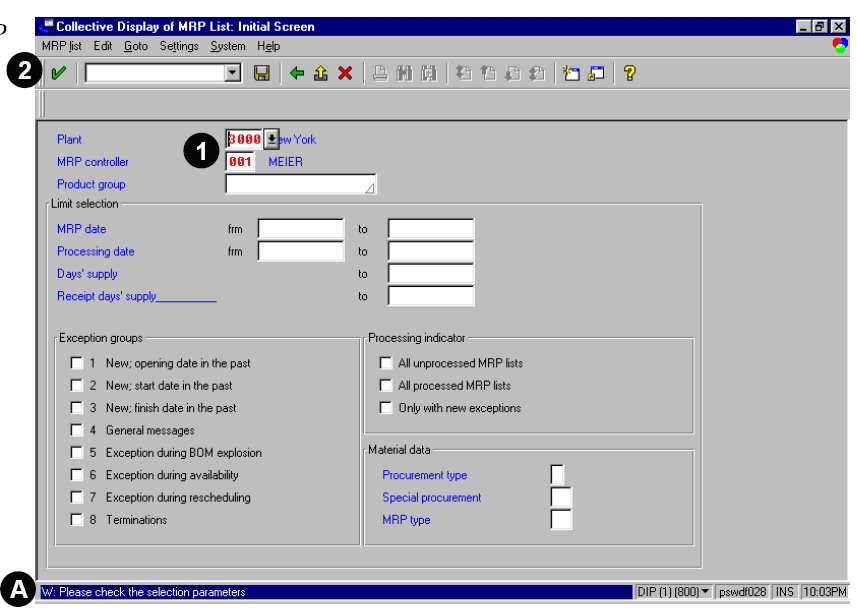
To access the first screen for this report, choose Logistics → Production → MRP → Evaluations → MRP list – coll.display.

1. You must enter the Plant and MRP controller.
All other fields are optional filters that further limit the selection.
2. Choose Enter. A The message in the status bar is a precaution to avoid wasted runtime on incomplete selections.

The collective display reflects the following:
B Material number and description
C Processing and new exception indicators
D Number of exception messages and exception group for material
E Additional information about the material
4. Double-click on a line to display the individual MRP list.

F The individual MRP list reflects the source of supply and demand by date.
G For further detail, choose Goto or Environment menus.
H The processing indicator may be manually set to flag the item. This indicator can also be set as a filter criteria on the first screen of this report.

The message in the status bar shows that the indicator was set.


ABAP Report ALV Block List in SAP Programming

This sap programming report with sample code using abap programming language explains you how to use alv block list to append the report.

REPORT ZALVBLOCK .

TYPE-POOLS : SLIS.

TABLES : AFKO,AFPO.

TYPES : BEGIN OF SAFPO ,
AUFNR LIKE AFPO-AUFNR,
POSNR LIKE AFPO-POSNR,
PLNUM LIKE AFPO-PLNUM,
STRMP LIKE AFPO-STRMP,
MATNR LIKE AFPO-MATNR,
PSMNG LIKE AFPO-PSMNG,
MEINS LIKE AFPO-MEINS,
END OF SAFPO.
TYPES : BEGIN OF SAFKO,
AUFNR LIKE AFKO-AUFNR,
END OF SAFKO.
DATA : IAFKO TYPE TABLE OF SAFKO WITH HEADER LINE,
IAFPO TYPE TABLE OF SAFPO WITH HEADER LINE.

DATA : IFIELDCAT1 TYPE SLIS_T_FIELDCAT_ALV,
WFIELDCAT1 TYPE SLIS_FIELDCAT_ALV,
ILAYOUT1 TYPE SLIS_LAYOUT_ALV,
IEVENT1 TYPE SLIS_T_EVENT,
WEVENT1 TYPE SLIS_ALV_EVENT,
IKEYINFO1 TYPE SLIS_KEYINFO_ALV.

DATA : IFIELDCAT2 TYPE SLIS_T_FIELDCAT_ALV,
WFIELDCAT2 TYPE SLIS_FIELDCAT_ALV,
ILAYOUT2 TYPE SLIS_LAYOUT_ALV,
IEVENT2 TYPE SLIS_T_EVENT,
WEVENT2 TYPE SLIS_ALV_EVENT.

SELECTION-SCREEN BEGIN OF BLOCK B1 WITH FRAME TITLE TEXT-001.

SELECT-OPTIONS : S_AUFNR FOR AFKO-AUFNR,
S_GLTRP FOR AFKO-GLTRP.

SELECTION-SCREEN END OF BLOCK B1.
START-OF-SELECTION.
CALL FUNCTION 'REUSE_ALV_BLOCK_LIST_INIT'
EXPORTING
I_CALLBACK_PROGRAM = SY-REPID.
  • I_CALLBACK_PF_STATUS_SET = ' '
  • I_CALLBACK_USER_COMMAND = ' '
  • IT_EXCLUDING =
.

PERFORM GET_DATA.
PERFORM BUILD_FIELDCAT.
PERFORM BUILD_LAYOUT.
PERFORM BUILD_EVENT.
PERFORM BUILD_KEYINFO.

PERFORM BUILD_FIELDCAT2.
PERFORM BUILD_LAYOUT2.
PERFORM BUILD_EVENT2.

PERFORM DISPLAY_BLOCK1.

PERFORM DISPLAY_BLOCK2.

CALL FUNCTION 'REUSE_ALV_BLOCK_LIST_DISPLAY'
  • EXPORTING
  • I_INTERFACE_CHECK = ' '
  • IS_PRINT =
  • I_SCREEN_START_COLUMN = 0
  • I_SCREEN_START_LINE = 0
  • I_SCREEN_END_COLUMN = 0
  • I_SCREEN_END_LINE = 0
  • IMPORTING
  • E_EXIT_CAUSED_BY_CALLER =
  • ES_EXIT_CAUSED_BY_USER =
EXCEPTIONS
PROGRAM_ERROR = 1
OTHERS = 2
.
IF SY-SUBRC 0.
  • MESSAGE ID SY-MSGID TYPE SY-MSGTY NUMBER SY-MSGNO
  • WITH SY-MSGV1 SY-MSGV2 SY-MSGV3 SY-MSGV4.
ENDIF.
&---------------------------------------------------------------------
*& Form GET_DATA
&---------------------------------------------------------------------
  • text
----------------------------------------------------------------------
  • --> p1 text
  • <-- li="" p2="" text="">
----------------------------------------------------------------------
FORM GET_DATA .
SELECT AUFNR FROM AFKO INTO CORRESPONDING FIELDS OF TABLE IAFKO
WHERE AUFNR IN S_AUFNR AND GLTRP IN S_GLTRP.

SELECT AUFNR POSNR PLNUM STRMP MATNR PSMNG MEINS FROM AFPO INTO CORRESPONDING FIELDS OF TABLE
IAFPO WHERE AUFNR IN S_AUFNR.
ENDFORM. " GET_DATA
&---------------------------------------------------------------------
*& Form BUILD_FIELDCAT
&---------------------------------------------------------------------
  • text
----------------------------------------------------------------------
  • --> p1 text
  • <-- li="" p2="" text="">
----------------------------------------------------------------------
FORM BUILD_FIELDCAT .
REFRESH : IFIELDCAT1.

*WFIELDCAT1-FIELDNAME = 'AUFNR'.
*WFIELDCAT1-COL_POS = '1'.
*WFIELDCAT1-SELTEXT_L = 'Order No'.
*APPEND WFIELDCAT1 TO IFIELDCAT1.
*CLEAR WFIELDCAT1.
WFIELDCAT1-FIELDNAME = 'GLTRP'.
WFIELDCAT1-COL_POS = '1'.
WFIELDCAT1-SELTEXT_L = 'Basic Finish Time'.
APPEND WFIELDCAT1 TO IFIELDCAT1.
CLEAR WFIELDCAT1.

WFIELDCAT1-FIELDNAME = 'GSTRP'.
WFIELDCAT1-COL_POS = '2'.
WFIELDCAT1-SELTEXT_L = 'Basic Start Time'.
APPEND WFIELDCAT1 TO IFIELDCAT1.
CLEAR WFIELDCAT1.

WFIELDCAT1-FIELDNAME = 'GAMNG'.
WFIELDCAT1-COL_POS = '3'.
WFIELDCAT1-SELTEXT_L = 'Total Order Qty'.
APPEND WFIELDCAT1 TO IFIELDCAT1.
CLEAR WFIELDCAT1.

WFIELDCAT1-FIELDNAME = 'GMEIN'.
WFIELDCAT1-COL_POS = '4'.
WFIELDCAT1-SELTEXT_L = 'UOM'.
APPEND WFIELDCAT1 TO IFIELDCAT1.
CLEAR WFIELDCAT1.

ENDFORM. " BUILD_FIELDCAT
&---------------------------------------------------------------------
*& Form BUILD_LAYOUT
&---------------------------------------------------------------------
  • text
----------------------------------------------------------------------
  • --> p1 text
  • <-- li="" p2="" text="">
----------------------------------------------------------------------
FORM BUILD_LAYOUT .
ILAYOUT1-COLWIDTH_OPTIMIZE = 'X'.
ILAYOUT1-ZEBRA = 'X'.

ENDFORM. " BUILD_LAYOUT
&---------------------------------------------------------------------
*& Form BUILD_EVENT
&---------------------------------------------------------------------
  • text
----------------------------------------------------------------------
  • --> p1 text
  • <-- li="" p2="" text="">
----------------------------------------------------------------------
FORM BUILD_EVENT .

WEVENT1-FORM = 'TOPOFLIST1'.
WEVENT1-NAME = SLIS_EV_TOP_OF_LIST.
APPEND WEVENT1 TO IEVENT1.

ENDFORM. " BUILD_EVENT
&---------------------------------------------------------------------
*& Form DISPLAY_BLOCK1
&---------------------------------------------------------------------
  • text
----------------------------------------------------------------------
  • --> p1 text
  • <-- li="" p2="" text="">
----------------------------------------------------------------------
FORM DISPLAY_BLOCK1 .
*CALL FUNCTION 'REUSE_ALV_BLOCK_LIST_HS_APPEND'
  • EXPORTING
  • IS_LAYOUT = ILAYOUT1
  • IT_FIELDCAT = IFIELDCAT2
  • IS_KEYINFO = IKEYINFO1
  • I_HEADER_TABNAME = 'IAFKO'
  • I_ITEM_TABNAME = 'IAFPO'
  • IT_EVENTS = IEVENT1
    • IT_SORT =
    • I_TEXT = ' '
  • TABLES
  • T_OUTTAB_HEADER = IAFKO
  • T_OUTTAB_ITEM = IAFPO
    • EXCEPTIONS
    • PROGRAM_ERROR = 1
    • MAXIMUM_OF_APPENDS_REACHED = 2
    • OTHERS = 3
  • .
*IF SY-SUBRC 0.
    • MESSAGE ID SY-MSGID TYPE SY-MSGTY NUMBER SY-MSGNO
    • WITH SY-MSGV1 SY-MSGV2 SY-MSGV3 SY-MSGV4.
*ENDIF.
*
CALL FUNCTION 'REUSE_ALV_BLOCK_LIST_APPEND'
EXPORTING
IS_LAYOUT = ILAYOUT1
IT_FIELDCAT = IFIELDCAT1
I_TABNAME = 'IAFKO'
IT_EVENTS = IEVENT1
  • IT_SORT =
  • I_TEXT = ' '
TABLES
T_OUTTAB = IAFKO
EXCEPTIONS
PROGRAM_ERROR = 1
MAXIMUM_OF_APPENDS_REACHED = 2
OTHERS = 3
.
IF SY-SUBRC 0.
  • MESSAGE ID SY-MSGID TYPE SY-MSGTY NUMBER SY-MSGNO
  • WITH SY-MSGV1 SY-MSGV2 SY-MSGV3 SY-MSGV4.
ENDIF.
ENDFORM. " DISPLAY_BLOCK1

FORM TOPOFLIST1.

WRITE :/10 'TABLE AFKO CONTENTS'.
WRITE :/(30) SY-ULINE.

ENDFORM.
&---------------------------------------------------------------------
*& Form BUILD_FIELDCAT2
&---------------------------------------------------------------------
  • text
----------------------------------------------------------------------
  • --> p1 text
  • <-- li="" p2="" text="">
----------------------------------------------------------------------
FORM BUILD_FIELDCAT2 .
REFRESH : IFIELDCAT2.
WFIELDCAT2-FIELDNAME = 'AUFNR'.
WFIELDCAT2-COL_POS = '1'.
WFIELDCAT2-SELTEXT_L = 'Order No'.
APPEND WFIELDCAT2 TO IFIELDCAT2.
CLEAR WFIELDCAT2.

WFIELDCAT2-FIELDNAME = 'POSNR'.
WFIELDCAT2-COL_POS = '2'.
WFIELDCAT2-SELTEXT_L = 'Order Item No'.
APPEND WFIELDCAT2 TO IFIELDCAT2.
CLEAR WFIELDCAT2.

WFIELDCAT2-FIELDNAME = 'PLNUM'.
WFIELDCAT2-COL_POS = '3'.
WFIELDCAT2-SELTEXT_L = 'Planned Order No'.
APPEND WFIELDCAT2 TO IFIELDCAT2.
CLEAR WFIELDCAT2.

WFIELDCAT2-FIELDNAME = 'STRMP'.
WFIELDCAT2-COL_POS = '4'.
WFIELDCAT2-SELTEXT_L = 'Strt Dt Plnd ordr No'.
APPEND WFIELDCAT2 TO IFIELDCAT2.
CLEAR WFIELDCAT2.

WFIELDCAT2-FIELDNAME = 'MATNR'.
WFIELDCAT2-COL_POS = '5'.
WFIELDCAT2-SELTEXT_L = 'Material No'.
APPEND WFIELDCAT2 TO IFIELDCAT2.
CLEAR WFIELDCAT2.

WFIELDCAT2-FIELDNAME = 'PSMNG'.
WFIELDCAT2-COL_POS = '6'.
WFIELDCAT2-SELTEXT_L = 'Pland Ordr Qty'.
APPEND WFIELDCAT2 TO IFIELDCAT2.
CLEAR WFIELDCAT2.

WFIELDCAT2-FIELDNAME = 'MEINS'.
WFIELDCAT2-COL_POS = '7'.
WFIELDCAT2-SELTEXT_L = 'UOM'.
APPEND WFIELDCAT2 TO IFIELDCAT2.
CLEAR WFIELDCAT2.
ENDFORM. " BUILD_FIELDCAT2
&---------------------------------------------------------------------
*& Form BUILD_LAYOUT2
&---------------------------------------------------------------------
  • text
----------------------------------------------------------------------
  • --> p1 text
  • <-- li="" p2="" text="">
----------------------------------------------------------------------
FORM BUILD_LAYOUT2 .
ILAYOUT2-COLWIDTH_OPTIMIZE = 'X'.
ILAYOUT2-ZEBRA = 'X'.
ENDFORM. " BUILD_LAYOUT2
&---------------------------------------------------------------------
*& Form BUILD_EVENT2
&---------------------------------------------------------------------
  • text
----------------------------------------------------------------------
  • --> p1 text
  • <-- li="" p2="" text="">
----------------------------------------------------------------------
FORM BUILD_EVENT2 .

WEVENT2-FORM = 'TOPOFLIST2'.
WEVENT2-NAME = SLIS_EV_TOP_OF_LIST.
APPEND WEVENT2 TO IEVENT2.
CLEAR WEVENT2.

ENDFORM. " BUILD_EVENT2
&---------------------------------------------------------------------
*& Form DISPLAY_BLOCK2
&---------------------------------------------------------------------
  • text
----------------------------------------------------------------------
  • --> p1 text
  • <-- li="" p2="" text="">
----------------------------------------------------------------------
FORM DISPLAY_BLOCK2 .
CALL FUNCTION 'REUSE_ALV_BLOCK_LIST_APPEND'
EXPORTING
IS_LAYOUT = ILAYOUT2
IT_FIELDCAT = IFIELDCAT2
I_TABNAME = 'IAFPO'
IT_EVENTS = IEVENT2
  • IT_SORT =
  • I_TEXT = ' '
TABLES
T_OUTTAB = IAFPO
  • EXCEPTIONS
  • PROGRAM_ERROR = 1
  • MAXIMUM_OF_APPENDS_REACHED = 2
  • OTHERS = 3
.
IF SY-SUBRC <> 0.
  • MESSAGE ID SY-MSGID TYPE SY-MSGTY NUMBER SY-MSGNO
  • WITH SY-MSGV1 SY-MSGV2 SY-MSGV3 SY-MSGV4.
ENDIF.

ENDFORM. " DISPLAY_BLOCK2

FORM TOPOFLIST2.
WRITE : /10 'TABLE AFPO CONTENTS'.
WRITE :/(35) SY-ULINE.
ENDFORM.
&---------------------------------------------------------------------
*& Form BUILD_KEYINFO
&---------------------------------------------------------------------
  • text
----------------------------------------------------------------------
  • --> p1 text
  • <-- li="" p2="" text="">
----------------------------------------------------------------------
FORM BUILD_KEYINFO .
IKEYINFO1-HEADER01 = 'AUFNR'.
IKEYINFO1-ITEM01 = 'AUFNR'.
ENDFORM. " BUILD_KEYINFO


SAP ABAP sd Report in ERP Programming

This abap report with erp programming report facilitates the sales shipping point analysis by shipping point, route, forwarding agent, and destination country. When processing deliveries, the shipping point is the principal criterion used to select deliveries. This report is updated in the information structure S005 when a delivery has been made. You can create company specific information structures and update rules to specify different means of collecting and reporting order data.

You must use Period to analyze selection criteria to run this report. You should limit the selection criteria to reduce the run time for the report.

The selection screen of this report includes:

Variants
Dynamic selection options
User settings for drilldown reports, default key figures, and other reporting parameters
Execution

The output of this report includes:

Dynamic filtering of output (by column) after the program has been executed to narrow down the displayed results: Position the cursor in a column and choose Edit → Set filter (Ctrl+Shift+F2)

Sorting capability (by column): Select a column and choose Edit → Sort in ascending/descending order (Ctrl+Shift+F5/F4)

Column width optimization: Select a column and choose Settings → Columns → Optimize width.

This report contains data that is statistically summarized. Based on your system’s configuration, this data is updated online by sales events or periodically by batch programs. This data cannot be manipulated.

To access the first screen for this report, choose
Logistics → Sales and distribution → Sales information system → Standard analyses → shipping point.

1. Enter the 10-week period you wish to analyze (for example, 24/1998 to 34/1998) in Period to
analyze. A period is determined by the date an order item is entered or changed.
2. Choose Execute.

This screen shows data based on the standard defaults for drilldown, key figures to be displayed, and other layout settings.

3. Double-click on a line item (for example, Dresden).
4. Choose Edit → Choose key figures to specify additional key figures or to change their sequence.

The following functions (extract) are available to further analyze the displayed data:

  1. Sorting (+/-)
  2. Top N/Last N
  3. Time series (periods in columns)
  4. Comparing two key figures
  5. Comparing actual/plan
  6. Comparing current/last year
  7. ABC analysis
  8. Correlation/classification
  9. Graphics

This screen shows a comparison between previous year shipping and current shipping information from the Dresden shipping point.


Related Posts:

SAP ABAP HR report for EEOC
ABAP Programming hr new hire report
SAP ABAP HR PAYROLL REPORT
ABAP HR head count report for sap

sales open deliveries abap programming report

SAP ABAP HR Entries and withdrawals Programming Report

This sap abap programming report lists employees who have entered or left the company within a certain period. You can choose any period as a reference point for this report.The output is presented in tabular view. The screen may be changed to a formatted page layout view. Columns and rows may be hidden from the display with mouse or function key controls. The data may also be transferred to Microsoft Excel, Word, or HTML through push buttons or menu selections available on the output display. Furthermore, connection to SAP Office lets you send the report to another R/3 user as a mail attachment.

This report includes:

  1. Variants
  2. Execution (and print) in background
  3. Standard selection fields available
  4. Additional selection fields (use Further Selections or Matchcodes buttons)
  5. Selection of entries and/or withdrawals
  6. Sorting of data according to the user’s preferences
  7. Data output to table or report, with links to Excel, Word, and HTML
  8. Ability to show/hide lines or columns of data

This report contains employee master data. As such, it cannot be changed or manipulated from the report, but it but does let you hide specific columns or rows of data.

To access the first screen for this ABAP report, choose Human resources → Personnel management → Administration → Reporting → Report selection → Employee → Entries/withdrawals → Employees who have Entered and/or Left the company.

1. Under Period, enter 01/01/1996 to 12/31/1996 in Other period.

2. Under Selection, enter 0 in Employment status. Select not equal to (≠) in order to exclude terminated employees.

3. Enter 300 in Personnel area.

4. Select EEs entered/left in order to include employees who have entered or left the company.

5. Choose Execute.

This screen shows Employees who have entered/left. Entering employees have an Entry date, while departing employees have a Leaving date.

Employees who have left and returned list in both columns (for example, Jonathan Benson left the company on June 1, but was rehired on June 2).

A Total number of employees selected (for example, 26)
B Function used to transfer data to report layout, SAP Office, Excel, and Word .

Related Posts:

SAP ABAP HR report for EEOC
ABAP Programming hr new hire report
SAP ABAP HR PAYROLL REPORT

Organizational challenges in crm and mysap solutions
Business View and Mysap.com
What is SAP R/3 introduction to mysap.com
SAP FICO cross company code reconciliation report