Showing posts with label ABAP WORK FLOW SCENARIOS IN SD. Show all posts

SAP Incomplete Sales document abap report

This sap report using abap programming lists all incomplete sales documents based on specified selection criteria.No prerequisites are required to run this report. However, entering selection
criteria is recommended. If you do not select the type of incomplete sales document you want to list, the list will be empty.From this abap report, you can branch out to the SD document and edit missing data from the report.

The selection screen of this erp programming report includes:

  1. Selecting incompleteness
  2. General
  3. Delivery
  4. Billing
  5. Price determination
  6. Status group
  7. Document selection
  8. Dynamic selection options
  9. User variables
  10. Output screen
  11. Type of incompleteness (shown on overview list)
  12. Background execution and printing
From this report, you can view missing data by marking a document and selecting the function Details. You can edit the selected document from this branch of the list. Position the cursor on a specific document to branch into that document and make your changes.

You can also process incomplete documents from the overview list by marking the documents to be changed and by selecting the function Edit documents. The list is not updated.

To access the first screen for this report, choose
Logistics → Sales and distribution → Sales → Environment → Document analysis → Incomplete documents.

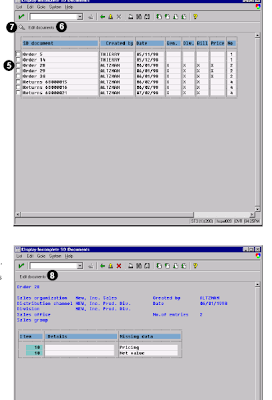
The screen shows the following important points as shown in the figure.

1. Under Incompleteness, select all types of incompleteness.
2. Under Organizational data, enter 0010 in Sales Organization.
3. For this example, no SD transactions need to be entered. For a list of transactions, click on
the SD transaction field to reveal a possible entries list.
4. Choose Execute.

This screen shows the list of incomplete sales documents. The matrix indicates the reasons for the incompleteness.
5. To edit a document, select the checkbox to the left of the desired SD document (for example, Order 28).
6. Choose Edit documents.
7. Choose Display to navigate to details of the incompleteness. This screen shows the selected sales document and indicates missing data.
8. Choose Edit documents, to edit this sales document.
Related Posts:

SAP ABAP HR report for EEOC
ABAP Programming hr new hire report
SAP ABAP HR PAYROLL REPORT
ABAP HR head count report for sap
SAP ABAP FICO REPORT FOR GROUP CURRENCY RECONCILIATION
fico reconcilation report for company code currency report
SAP ABAP FICO report about profitability analysis
SAP ABAP fico report profitability analysis report
My sapcrm customers and consumer segmentation
Organizational challenges in crm and mysap solutions
Business View and Mysap.com
What is SAP R/3 introduction to mysap.com
SAP FICO cross company code reconciliation report
sap sales and distribution back orders report in abap

sap sd customer distribution incoming order report


WORK FLOW FOR SD COMPLETE

Learn about work flow in sap abap sales and distribution module below.

SAP WORK flow in sales and distribution 1
SAP WORK flow in sales and distribution 2
SAP WORK flowin sales and distribution 3
SAP WORK flow in sales and distribution 4
SAP WORK flowin sales and distribution 5
SAP WORK flowin sales and distribution 6
SAP WORK flow in sales and distribution 7


related info

ABAP 51 Days Complete Course
ABAP Dictionary
OOPS in ABAP
BDC
SAP Scripts
SAP Scripts Controls
SAP Smart Forms
Real Time ABAP Programming Reports
SAP Interview Questions
Syntax for ABAP Programming
ABAP Interface Programming
Financial and Controlling Sample Reports  Work Flow
Work Flow MM
Work Flow SD
Communication Interface
MySAP CRM Customer Relationship Management
MySAP Best ERP

SAP ABAP WORK FLOW FOR MM

SAP ABAP WORK FLOW COMPLETE

Work Flow Scenarios in Sales and Distirbution of SAP ABAP Part Seven

Standard Role AC2000045: Agent for Internet Sales :Order (SD-SLS)


This standard role determines positions or organizational units that are assigned to a sales office or sales area transferred in a role container.If this container includes a reference to a sales office (parameter Sales office), the employees responsible for this sales office are determined. If this role resolution leads to no employees being determined, or the container does not contain a sales office (because one is no defined for the online store), the employees responsible for the sales area (parameter Sales And Distrib Area) are selected.The structure and assignment of SAP organizational object types Sales office and Sales area to object types of organizational management in Customizing is described later in this document.


Workflow Template: Correcting errors in Internet sales :orders (SD-SLS)

Use

If an error occurs in a sales order or quotation in the IAC “Online Store”, the system starts a workflow based on the template SD_KI_WF.

Workflow template: 20000169, abbreviation: SD_KI_WF, name: Correct errors in Internet sales order Triggering events of the workflow template.

The event erroInternetCreate (error creating in the Internet) for object type BUS2032 (sales order) is the triggering event for the workflow template.

This “link” between the event and the workflow template to be triggered is deactivated in the standard system and must first be activated in Customizing for SAP Business Workflow, before the workflow template is actually triggered.

Preparation and Customizing (SD-SLS) :Workflow container and binding

As the workflow can only be started if a sales order or quotation is not created because of an error, no object reference to a sales order is availabe.

The information exists as event parameters in the container of the triggering event and must be transferred to the workflow container via a binding.

As a result, the following binding definition between the triggering event and the workflow container is defined in the standard system:

Workflow container Event parameter container
MessageType MessageType
MessageID MessageID
MessageNumber MessageNumber
MessageText MessageText
MessageDetail MessageDetail
OnlineStore OnlineStore
OstoreDescription OstoreDescription
SalesDocumentType SalesDocumentType
RequestedDelivDate RequestedDelivDate
PricingDate PricingDate
SalesOffice SalesOffice

SalesAndDistribArea SalesAndDistribArea
OrderingParty OrderingParty
MaterialList MaterialList
SalesOrderSimulate SalesOrderSimulate
PaymentMethod PaymentMethod
PaymentCardType PaymentCardType
CardNumber CardNumber
ExpirationDate ExpirationDate

These elements have been created in addition to the elements available in the standard system.

RELATED POSTS


WORK FLOW IN SD PART 1
SAP Network Level Security
Mysap web application server

SAP web application and business server pages
SAP authorization and client administration in mysap.com

Work Flow Scenarios in Sales and Distirbution of SAP ABAP Part Six

Removing Errors in Internet Sales Orders (SD-SLS)

In the Internet application component Online Store, customers can obtain quotes and enter orders over the Internet. They can choose to pay either by invoice, credit card or cash on delivery.If a quotation or order cannot be created because certain master data or Customizing settings are missing or not properly maintained, the transaction is cancelled and an error message is displayed in the customer’s browser.This workflow enables the relevant associates to be informed automatically about the error so that they can be corrected as quickly as possible.

Process Flow

The event triggering the workflow is generated automatically when an error occurs in the entry of a sales order or quotation in an Online Store.A work item containing information about the errors that occurred and all the details required to correct the error is sent to the inbox of the sales associates responsible for the Online Store.

Technical Implementation (SD-SLS)

Object Types Used

Object technology is used to create the interface between the R/3 functions and the workflow system. The information given below is of a technical nature and is not necessary for an initial overview.

Standard Tasks

The standard tasks provided by SAP as single steps describe the basic business activities from an organizational point of view. A single-step task relates to a single object method (= technical link to R/3 functionality), and is linked to the agents possible from an organizational point of view.

Workflow Template

The actual operational procedure is implemented as a workflow template. You can find this workflow template in your R/3 system.
Object: Sales Order (SD-SLS)
Definition

The sales order business object (object type BUS2032) is a request from a customer to a company asking for a specific quantity of materials to be delivered, or services to be rendered, on a given date.A sales order is sent to a sales area, and this sales area is then responsible for fulfilling the contract.

Use

It is also possible to simulate a sales order. In this process, prices are determined, taking account of customer-specific conditions, and current delivery data is determined for a sales order, but the sales order itself is not created. A simulated sales order is referred to as a quotation in this case (not to be confused with the customer quotation business object, object type BUS2031).

Location in object repository: Sales and distribution _ Sales _ Customer quotation
Standard Task TS20000357: Error in Quotation (SD-SLS)

Use

This standard task is used to decide whether an error that occurred during creation of a quotation (in this case, equivalent to the simulation of a sales order in the online store) is to be corrected.

The agent is provided with all information needed to reconstruct and correct the error. This includes the error message plus long text, the online store in which the error occurred, the sales are responsible, the ordering party (customer), all materials in the order items, the pricing date and the delivery date.The agent can end processing of the task by choosing Error corrected. The agent can also cancel the task, in which case the task remains in the agent’s integrated inbox for further processing.

Object method referenced: object type DECISION, method: Process
Agent assignment: For the validity period, this standard task is addressed to the agents in the sales office or sales area which are responsible for the online store. These employees are determined via standard role 20000045 (agent for Internet sales orders).

Standard Task TS20000347: Error in Order on Account(SD-SLS)

Use

This standard task is used to decide whether an error that occurred during creation of a order for which an invoice is to be issued to the customer is to be corrected. As in standard task TS20000357, the agent is provided with all information needed to reconstruct and correct the error. In addition, the agent is told that the customer wanted the order to go on his/her account and that an invoice was to be issued.

The agent can end processing of the task by choosing Error corrected. The agent can also cancel the task, in which case the task remains in the agent’s integrated inbox for further processing.

Object method referenced: object type DECISION, method: Process
Agent assignment: For the validity period, this standard task is addressed to the agents in the sales office or sales area which are responsible for the online store. These employees are determined via standard role 20000045 (agent for Internet sales orders).

Standard Task TS20000346: Error in Credit Card Order (SD-SLS)


This standard task is used to decide whether an error that occurred during creation of a credit card order is to be corrected. As in standard task TS20000357, the agent is provided with all information needed to reconstruct and correct the error. In addition, the agent is told that the customer wanted to pay by credit card, and is informed of the type of credit card, the card number, and the expiration date.The agent can end processing of the task by choosing Error corrected. The agent can also cancel the task, in which case the task remains in the agent’s integrated inbox for further processing.

Object method referenced: object type DECISION, method: Process
agent assignment: For the validity period, this standard task is addressed to the agents in the sales office or sales area which are responsible for the online store. These employees are determined via standard role 20000045 (agent for Internet sales orders).

Standard Task TS20000372: Error in Cash-on-Delivery Order (SD-SLS)

This standard task is used to decide whether an error that occurred during creation of a cash-ondelivery order is to be corrected. As in standard task TS20000357, the agent is provided with all information needed to reconstruct and correct the error. In addition, the agent is told that the customer wanted to pay by cash on delivery.The agent can end processing of the task by choosing Error corrected. The agent can also cancel the task, in which case the task remains in the agent’s integrated inbox for further processing.

Object method referenced: object type DECISION, method: Process,

Agent assignment: For the validity period, this standard task is addressed to the agents in the sales office or sales area which are responsible for the online store. These employees are determined via standard role 20000045 (agent for Internet sales orders).

RELATED POSTS

Work Flow Scenarios in Sales and Distirbution of SAP ABAP Part Five

Standard Tasks (SD-SLS-OA)

Standard tasks are single-step tasks supplied by SAP that describe basic business activities.The following standard tasks are delivered:
TS20000140
TS20000141
TS20000409
TS20000233

Standard task: TS20000140

Identification code: SD_KK_CHANGE

Description: Change customer contract in the background
Referenced method, attributes Object type: BUS2034 (master contract)
Method: CHANGEINBACKGROUND
Attributes: Background processing
In this task, the system tries to change the lower level contracts, according to the changes in the group contract, in the background. If a temporary error occurs (for example, the document is locked), the system calls up task TS20000409. If this task cannot be implemented because of an application error, the system calls up task TS20000141.

Standard task: TS20000141
Identification code: SD_KK_EDIT
Description: Change customer contract online
Referenced method, attributes
Object type: BUS2034 (master contract)
Method: EDIT (online method)
Attributes: None
If the system could not change the lower level contract in background processing, the person who changed the master contract in task TS20000141 receives a work item in the inbox and can then make the change online.

Maintain Processor Assignment We recommend that you classify TS20000141 as a general task so that the person who changed the master contract is also permitted to process the lower level contracts. If any errors occur, the person who changed the master contract receives a work item in their inbox.

Standard task: TS20000409

Standard Tasks (SD-SLS-OA)
30 April 2001
Identification code: SD_KK_EDIT
Description: Change customer contract in the background (inbox)
Referenced method, attributes
Object type: BUS2034 (master contract)
Method: CHANGEINBACKGROUND
Attributes: Background processing
If a temporary error occurs (for example, the document is blocked), the system will try to change the master contract again in the background at a later point. You can define the time span at which this occurs in Customizing. If the system cannot make the changes, the person who changed the master contract receives a work item in their integrated inbox.

Starting the work item causes the system to try and change the lower level contract in the background. The work item stays in the employee’s inbox until the changes could be made or an application error occurs.
If an application error occurs, task TS200000141 is called up and the person who changed the document receives another work item in their integrated inbox that can only be processed online.

Standard task: TS20000233
Identification code: SD_GK_DQ
Description: Unlock master contract
Referenced method, attributes
Object type: BUS2095 (master contract)
Method: DEQUEUE (synchronous method)
Attributes: Background processing
Once workflow has started, the system automatically sets the ENQUEUE_GRP indicator (block master contract until all lower level contracts have been updated) in table VBAK (sales document header data). Once the whole workflow has finished, the system deselects this indicator using task TS20000233.

Preparation and Customizing (SD-SLS-OA)

Application-Specific Customizing

You need to make the following settings in Customizing for Sales and Distribution:

Update lower level contracts Select the Update lower level contract field for sales document type group contract, so that the workflow copies all the changes in the master contract into the assigned lower level contracts, according to the referencing procedure.

Make this setting by going to Customizing for Sales and Distribution and choosing Sales __Sales Documents __Sales Document Header _ Define sales document types for the
sales document type group contract.

Processor assignment

Assign a processor by going to Customizing for Sales and Distribution and choosing Sales __Sales Documents __Contracts _ Master Contract __Activate Workflow for Master Contracts.

Event linkage

You must activate event linkage for object types BUS2095 and BUS2034. You can do this by going to Customizing for Sales and Distribution and choosing Sales Documents __Contracts _ Master Contract _ _Activate Workflow for Master Contracts. For more information on this Customizing activity, see the online Implementation Guide. Customizing for SAP Business Workflow.

 Note that the changes in the lower level contracts are made according to thereferencing procedure for the master contract that was agreed on in Customizing.See the relevant chapter in the Implementation Guideline for master contracts.Organizational Plan You can also assign the people who can change the master contract to other organizational units.

Organizational units are areas within a company that belong together for organizational and business purposes, such as a department. However, they are not normally required for the workflow scenario. Only those employees who are authorized to change master contracts and who have changed a master contract, receive a work item in their inbox if an application error occurs, for example, if the workflow is incorrectly implemented. The work item can be forwarded to all the people who are listed in the employee assignment but the employees who process it must also be authorized to change the contracts.

You can set up the organizational plan in Customizing for Basis. In the Implementation Guide, choose Basis Components _ Business Management _ SAP Business Workflow _ Edit organizational plan.

Change customer contract in the background: Set time span
If a temporary error occurs when you change the contract (for example, the lower-level contract is blocked), the system will try to change the master contract again in the background at a later point. You can define the time span at which this occurs in Customizing.

You can define the time span in Customizing for Workflows (Basis Components _ SAP Business Workflow _ Basic Settings (System, SAP Business Workflow) _ Activate automatic monitoring of incorrect work items).

Using and Linking to the Application Functions (SDSLS- OA)

Prerequisites

You have created the link to the workflow (see application-specific Customizing), created a master contract, and assigned the lower level contracts to the master contract.

Process Flow

1. Change a field in the master contract for which there is a rule in the referencing procedure (Customizing for master contracts).
2. This triggers the changed event for business object BUS2094 (master contracts) and initiates the workflow template WS20000049.
3. The workflow template WS2000048 is called up for each lower level contract related to the changed master contract.
4. The system implements the standard task TS20000140 (change in background) for all the lower level contracts:

The system calls up standard task TS20000141 (implement change online) for all lower level contracts that cannot be changed in the background (change failed event for object type BUS2094).The person who changed the master contract receives a work item in their inbox. The employee can change the lower level contract directly from the inbox using the information displayed in another window about the changes made in the master contract. The whole workflow finishes if all the lower level contracts are changed.

The system calls up task TS20000409 (background change of customer contract) for all lower level contracts that contain a temporary error (blocked by processing).after a certain time span, which has been defined in Customizing for workflows, the system tries to change the lower level contracts in the background again. The workflow is complete once all the lower level contracts have been changed. If the  system cannot change the contract because it is still blocked, for example, the person who changed the master contract receives a work item in their integrated inbox.

When they execute the work item, the system changes the lower level contract in the background. The work item remains in the inbox until the lower level contract has been changed. If an application error occurs when the system changes the contract in the background, it calls up task TS20000141. The employee receives a work item in their integrated inbox that can only be processed online.Once all the workflows are finished for the lower level contracts, the whole workflow ends.

In order to guarantee consistent data retention, all the lower level contracts that are to be changed are blocked until the relevant workflow has finished for the lower level contract. 

RELATED POSTS


Work Flow Scenarios in Sales and Distirbution of SAP ABAP Part Four

Using Workflow to Change the Master

As well as selling office equipment, Miller Ltd also offer their customers an extensive maintenance service. Miller Ltd has signed several maintenance contracts with one of their customers.The same terms of payment are valid for all the maintenance contracts signed with that customer. These maintenance contracts are assigned to a master contract which contains all terms of payment.

The customer would like to change the terms of payment. The employee responsible at Miller Ltd, Ms. Connelly, changes the terms of payment in the master contract and the changes are automatically copied into all the assigned lower level contracts.

If an error occurs in the system to prevent the changes from being made, Ms. Connelly receives a work item in her integrated inbox for each of the lower level contracts that could not be changed. She can change the lower level contract directly from the inbox using the information displayed in another window about the changes made in the master contract.

If any of the lower level contracts that need to be changed are blocked by another employee, the system carries out the changes in the background. If the document remains blocked, Ms. Connelly receives a work item for that lower level contract in her integrated inbox. Starting the work item causes the system to try and change the lower level contract in the background. The work item stays in Ms. Connelly’s inbox until the changes could be made or an application error occurs. If an application error occurs, Ms. Connelly receives another work item in her integrated inbox that can only be processed online. Once the lower level contract has been changed, the
work item is completed and the document is unblocked.

The lower level contracts that have not yet been updated are blocked for manual processing until the workflow has finished successfully.

Object Types (SD-SLS-OA)

The interface between R/3 functions and the workflow system is created using object technology.

The following scenario explains how:

Master contracts: Object type BUS 2095
Customer contract (lower level contract): Object type BUS 2034
are processed.

Workflow Template (SD-SLS-OA)

The following two workflow templates are delivered in the standard system for changing master contacts:

Identification:WS20000048
Identification code: SD_KK_WF
Long text: Workflow for changing customer contracts
Identification: WS20000049
identification code: SD_GK_WF
Long text: Updates according to master contract
Workflow Template WS20000049

Triggering Event in Workflow Template

When you change the master contract, the changed event for object type BUS 2095 (master contract) is triggered and starts the workflow template. Workflow template WS20000048 starts for all the lower level contracts assigned to the master contract. Workflow template WS20000048 generates a work item for each lower level contract.

Workflow Container and Data Flow Information on object reference for the master contract to be processed (_EVT_OBJECT), the name of the person who changed the master contract (_EVT_CREATOR), a list of all the lower level contracts that should be changed (CONTRACTLIST), and the values that should be changed according to the referencing procedure (CHANGEDVALUES) must be available in the workflow.

This information is available as an event parameter in the container for the triggered event and has to be transferred into the workflow container using data flow.

The following data flow definitions between the triggering event and the workflow container have been defined in the standard system:

RELATED POSTS

Work Flow Scenarios in Sales and Distirbution of SAP ABAP Part three

Preparation and Customizing (SD-SLS-RE)

All the users who have been identified in Customizing for the SAP Business Workflow may release credit memo requests. These users can also be assigned to different organizational units.Organizational units are areas within a company that belong together for organizational and business purposes, such as a department.The following organizational units, positions and the people who fill them have beenset up in the system:

Organizational unit Chief position Filled by

Sales organization 0001 Sales manager Miller

Sales area 0001/01/01 Group leader Haywood

You can set up the organizational plan in Customizing for Basis. In the Implementation Guide, choose Basic Components _ Business Management _ SAP Business Workflow _ Edit organizational plan.

Event-Receiver Linkage

The event created for object type BUS2094 (credit memo request) is the triggering event for the workflow template 20000009 and is the standard entry in the event linkage table. In order to start the workflow template, you must activate the linkage between the triggering event and the workflow template, as the receiver for the event, in Customizing for the SAP Business Workflow.

Activate Event-Receiver Linkage

1. Make the settings in Customizing (choose Basic Components _ Business Management

SAP Business Workflow __Perform task-specific Customizing).
2. Activate the event linkage for the workflow template (Sales and distribution Sales Activate event linking).You can also activate the event-linkage by generating workflow template 2000009directly. Using and Linking to the Application Functions (SDSLS- RE)

Activities

In the following description, we assume that you have created a credit memo request.Generating Events The created event that triggers the workflow is created automatically once a credit memo request has been created.

Processing Credit Memos

The people who have been assigned to this task receive a work item in their inbox. If this work item is executed, the credit memo can be released, canceled or processed.
You can call up the inbox by choosing Office __Inbox.

Change Master Contract (SD-SLS-OA)

In companies that use a high number of contracts, several contracts are often subject to the same business controls (for example, agreements on pricing or terms of payment). Contracts with the same business requirements can be linked to a master contract as lower level contracts.The general requirements stipulated in the master contract are then valid for all the lower level contracts assigned to it. The referencing procedure acts as a set of rules in Customizing which enables you to control which data from the lower level contract can be changed and which data has to agree with the master contract. This ensures that the defined requirements remain consistent in all the assigned lower level contracts.

If any of the fields in the master contract that have to be identical to the equivalent fields in the lower level contract are changed, these fields must also be changed in all assigned lower level contracts.The workflow enables you to control the process of changing master contracts simply and efficiently . All the lower level contracts assigned to a master contract are updated and the employees involved are automatically informed if an error occurs, such as an application error or if the document is blocked.

Process Flow

Changing the master contract triggers a workflow that accesses the assigned lower level contracts and automatically copies the changes to the lower level contract. If an error occurs, a work item appears in the inbox of the person who changed the master contract, who has to process it manually. A separate window displays all the changes that have been made for information purposes.

If a temporary error occurs in a lower level contract that you want to change, for instance, it is blocked because someone is processing it, the system carries out the changes later on in the background. You can decide how much later on the system makes the changes by making the settings for a time span in Customizing. If the system cannot make the changes after several attempts, the person who changed the master contract receives a work item in their integrated inbox. When you trigger the work item, the system tries to change the lower level contract in the background again. If an application error then occurs, the system replaces the work item with a
new one that can only be processed online.

In order to guarantee consistent data retention, all the lower level contracts that are to be changed are blocked until the workflow has finished. Once the changes have been made, the workflow finishes and the document is unblocked.

RELATED POSTS


Work Flow Scenarios in Sales and Distirbution Part Two

Processing Credit Memo Requests

Each employee in the sales department is allowed to release credit memo requests up to a value of USD 300. The following authorization procedure has been defined for credit memo requests that exceed this limit:

Credit memo requests with a value of between USD 300 and USD 5,000 may only be released by the group leader.Credit memo requests that exceed a value of USD 5,000, may only be released by the sales manager.

Object Types (SD-SLS-RE)

The interface between R/3 functionality and the workflow system is created using object technology.In the following scenario, the business application object forCredit memo requests is Object type BUS 2094.

Initial Values (SD-SLS-RE)

In the workflow, the person who releases or processes the credit memo request is decided according to the value of the credit memo request. You can determine two limit values: Amount limit 1 and amount limit 2.In order to ensure correct, cross-company code credit memo processing, you also need to specify a reference currency. The document currency for the credit memo request is then converted into the reference currency.

The following company codes and their house currencies exist in one company:

Company code 1: House currency FRF
Company code 2: House currency DEM

The employees assigned to the sales organization process the credit memo requestsfor company code 1 and company code 2.A reference currency (for example, USD) is defined in the workflow container. Thenet values in the sales documents are converted into the reference currency whichmeans that the credit memo requests can then be processed and checked,independently of the currency in the company code.

Workflow Template (SD-SLS-RE)

Definition

The following two workflow templates are delivered in the standard system for credit memo processing:

Identification:WS20000009
Identification code: Credit memos
Long text: Credit memo processing

Identification: WS20000019
Identification code:CMR_CHECK
Long text: Check credit memo requests
For additional information, see:
Flow of Workflow Template [Page 14].

Use

Workflow Template 20000009 Credit Memo Processing

Triggering Event in Workflow Template

Updating the credit memo request triggers the event created for object type BUS2094 which starts the workflow template.

Workflow Container and Data Flow

The information needed for the workflow is contained in the credit memo request. This information is available as an event parameter in the container for the triggered event and have to be transferred into the workflow container using data flow.The following data flow definition between the triggering event and the workflow container is therefore defined in the standard system:
Workflow Container Event Parameter Container

WF_Initiator <-- _EVT_Object (credit memo request) RefCurrency (reference currency) CUSTCOMPLAINTORDER (credit memo request) NetValue_Limit_1 (amount limit 1) NetValue_Limit_2 (amount limit 2) End_Flag (End indicator) The _WF_Initiator element is available in the workflow container in the standard system, while the other elements listed here have been added to the workflow container. Terminating Events The workflow template for credit memo requests is terminated with the Release credit memo request and Reject credit memo request events.

Check Workflow Template 20000019 Credit Memo Processing Workflow Container The workflow container contains the end indicator (End_Flag), information about the credit memo request (CUSTCOMPLAINTORDER) and the employee responsible (Responsible Agents). Processor Assignment All people or organizational units that are assigned to the workflow template are informed. Maintain Processor Assignment Depending on the net value of the credit memo request and the defined organizational plan, the employee responsible receives a work item in his or hers integrated inbox. For this to take place, you must list the various objects from organization management in Customizing for the SAP Business Workflow who can work with workflow-relevant credit memo requests, for example, jobs or positions.

Before you do that, you need to set up the organizational plan. User Haywood has the group leader position while user Miller is in the sales manager position. Flow for Workflow Template When you create a credit memo request, the created event is triggered for object BUS2094 and the workflow template 20000009 is started. The system checks how high the net value of the credit memo request is. If the net value is below limit 1 (minimum limit), the system automatically releases the credit memo request in background processing. If the net value of the credit memo request is over limit value 1, the system terminates workflow template 20000009 and initiates workflow template 20000019. The relevant employee, depending on the value of the credit memo request and the organizational structure in use (sales organization, distribution channel, division), is then informed of this by the arrival of a work item in their integrated inbox.

If the employee releases the credit memo request, the system ends the workflow and deletes the work item from the inbox. If the employee stops processing the work item, it remains in the inbox until it has been completed and only then is the workflow finished. If the employee changes any of the determining factors in the credit memo request (such as net value), the net value of the credit memo request has to be re-checked. The system deletes the work item from the inbox. Workflow template 20000009 receives a terminating event and workflow template 20000019 is triggered. Depending on the value of the item, the relevant employee is informed and receives a work item in their integrated inbox.

Once the employee has finished processing the work item (by rejecting or releasing the credit memo request), the workflow is concluded. If the credit memo request is changed, workflow template 20000019 is called up. Processing continues until the credit memo request has either been rejected or released. Terminating Events The workflow template for checking credit memo requests is terminated with the Release credit memo request and Reject credit memo request events. Standard Tasks (SD-SLS-RE) Definition Standard tasks are single-step tasks supplied by SAP that describe basic business activities.

RELATED POSTS


Work Flow Scenarios in Sales and Distirbution One

Credit memo requests normally need to be checked by the employee who entered them as well as approved by an additional decision-maker. The value of the credit memo determines who is able to approve it.Once a credit memo request is created, the system normally creates a billing block. This block prevents you from billing the credit memo request and can only be removed by an authorized employee.

Using the workflow, you can represent the whole business process, with all the people involved, for approving credit memo requests within your company. This enables you to process credit memo requests simply and efficiently. If you do not use the workflow, the system does not control the process flow so you will have to organize the steps in credit memo processing yourself.


If the value of a credit memo request is below a minimum value, the system automatically releases it for billing by removing the billing block. If the credit memo request exceeds a certain value, the system automatically informs the employee responsible. She or he receives a work item in their inbox and can process it directly from there. The employee responsible can cancel, release, or process a credit memo request. If the employee cancels the request, the system automatically creates a reason for rejection in the credit memo request and ends processing. If the employee releases the request, the system automatically removes the billing block in the credit memo request and releases it for billing. If the employee processes the request, she or he can use all the functions available in the change transaction.The people informed by the workflow do not need to know either the name of the transaction or the menu path of the transactions involved.

Prerequisites

You have configured the settings in Customizing for the workflow and created an organizational plan.When you create credit memo requests, the system normally sets a billing block, which prevents it from being billed. Only authorized employees may remove this billing block, thus releasing the document for billing. The person who is able to check the credit memo before releasing it depends on the value of the credit memo.You create the billing block for credit memo requests in Customizing for Sales and Distribution when you define the order type (Sales and Distribution __Sales __Sales Documents_ Sales Document Header _ Define sales document types).

When using the workflow for processing credit memo requests, we recommend that you should only allow the billing block to be removed by the people who are authorized to release credit memos of any value.

Process Flow

Depending on the value of the credit memo request, the system runs through one of the following processes when you enter a credit memo request:

If the value of the credit memo request is smaller or equal to a certain limit (L1), the system automatically releases the credit memo request. The system removes the billing block in the background, releasing the credit memo request for billing.If the value of the credit memo request is between limit L1 and limit L2, or equal to L2, the job responsible is informed that the credit memo request should be checked. All the people assigned to this job receive a work item in their integrated inbox, where they can cancel, release or process the credit memo request.

Cancel credit memo request

The employee has to enter a reason for rejection. The system automatically transfers the reason for rejection into the credit memo request and stops processing.

  1. Release credit memo request
  2. The system automatically removes the billing block in the credit memo request and releases the document for billing.
  3. Process credit memo request

Here, the user branches into the “Change sales order” transaction, where they can use all the functions in this transaction. According to the user’s authorization, he or she can remove a billing block, enter a reason for rejection, or process individual items (for example, delete or add order items, or change the order quantity).

The system checks whether the billing block was removed manually. If there is a billing block, the system re-checks the value of credit memo request and informs the employee responsible. This process is repeated until the credit memo request has either been rejected or released.

RELATED POSTS